Thousands of scanned slides.
Every one facing the right way.

Picture Rotator uses on-device AI to find every rotated and mirrored image in your scan folders β€” and fixes them all losslessly with one click. Offline. In minutes, not evenings.

For Windows 10/11 Β· One-time purchase Β· No subscription Β· No uploads
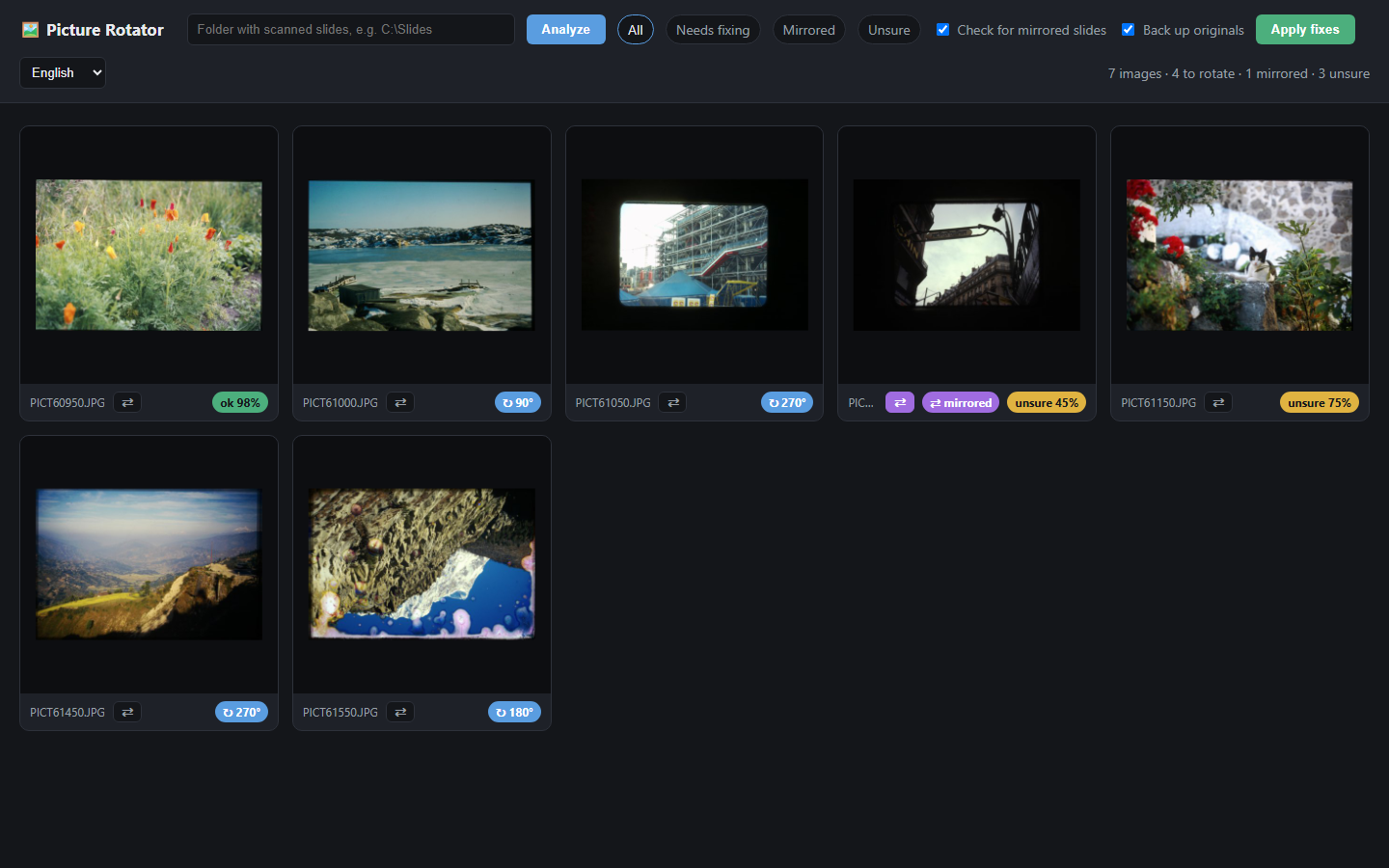
Picture Rotator analyzing a folder of scanned slides
β‘  After analysis β€” 4 to rotate, 1 mirrored β‘‘ After one click β€” everything upright

Built for people who digitize for real

Born in a photo-digitization studio that scans thousands of dia slides a week β€” and got tired of rotating them by hand.

🧠

AI rotation detection

A deep-learning model reads the content of every photo β€” skies, horizons, faces, trees β€” and works out which of the four orientations is right, with a confidence score for each image.

95%+ accuracy on real slide scans
πŸͺž

Catches mirrored slides

Slides inserted back-to-front are a classic scanning error. Picture Rotator reads any text in the photo both ways β€” if it only makes sense mirrored, the slide is flagged and flipped.

Signs, shopfronts, labels β€” busted
πŸ’Ž

Truly lossless

Rotations and flips are performed directly on the JPEG's compressed data β€” no re-encoding, zero generation loss. Files usually come out 3–10% smaller. EXIF, color profiles and file dates are preserved.

Archival-grade
πŸ“

Made for bulk

Point it at a folder of hundreds or thousands of scans. Confident fixes are queued automatically; only the genuinely ambiguous few are set aside for your eyes.

πŸ”’

100% private, 100% offline

Everything β€” the AI, the text reader, the JPEG engine β€” runs on your own PC. Your family's photos never touch the internet. No account, no cloud, no telemetry.

🌍

Speaks your language

The interface is available in English, Swedish, Spanish and French β€” switchable on the fly.

Three steps. That's the whole workflow.

What you see is what gets saved β€” nothing is written until you click Apply.

A sideways slide detected with a 90 degree badge
STEP 1

Analyze a folder

The AI scores every image in seconds. Sideways scans get a rotation badge β€” here a slide flagged for a 90Β° fix.

A mirrored slide detected automatically
STEP 2

Review the flagged few

Mirrored and unsure images are highlighted. Click any photo to turn it, or tap ⇄ to flip β€” instant preview, full control.

The full grid after fixes, everything upright
STEP 3

Apply β€” losslessly

One click fixes the whole batch. Originals are backed up first, and every file stays pixel-perfect.

Simple pricing

One license, yours forever.

$29 one-time
  • Full version for Windows 10/11 (64-bit)
  • Unlimited photos, unlimited folders
  • All four languages included
  • Free updates
  • 30-day money-back guarantee
Buy now β€” instant download

Secure checkout via Stripe. Download link delivered by email.

Questions & answers

Do my photos get uploaded anywhere?

Never. Picture Rotator runs entirely on your computer β€” the AI model, the text recognition and the JPEG engine are all bundled inside the app. It works with the network cable unplugged.

Is the rotation really lossless?

Yes. JPEG files are transformed in their compressed form (the same technique as the classic jpegtran tool), so there is no re-encoding and no quality loss β€” ever. Thanks to entropy re-optimization, fixed files are typically 3–10% smaller than the originals. PNG and TIFF files are supported too.

What if the AI gets one wrong?

Nothing is changed until you click Apply. Low-confidence images are set aside in an "Unsure" tab for a quick human glance, every thumbnail is clickable to rotate or flip manually, and originals are backed up to a subfolder by default.

How does the mirror detection work?

The app reads any text visible in the photo β€” street signs, shop fronts, packaging β€” in both directions using built-in OCR. If the text only reads correctly when the image is flipped, the slide was scanned back-to-front and gets flagged. Images without text can be flipped manually with one click.

What are the system requirements?

Windows 10 or 11, 64-bit, about 2 GB of free disk space. No installation is required β€” unzip and run. No internet connection needed after download.

How is the software delivered?

Right after checkout you receive an email with your download link. Unzip the folder anywhere and double-click "Start Picture Rotator".